> For the complete documentation index, see [llms.txt](https://help.tahua.io/llms.txt). Markdown versions of documentation pages are available by appending `.md` to page URLs; this page is available as [Markdown](https://help.tahua.io/knowledge-base/administrator-help-guides/administrator-permissions-and-user-management.md).
# Administrator Permissions & User Management
When your organisation registers with Tahua to use the platform to manage your grants, you will receive an initial email directly from us to set up your first Administrator account.
Once your organisation/first Administrator has created the account on behalf of your organisation, you can then invite others to have admin access to Tahua.
To access the Administrator Portal, you must be invited by an existing Administrator within your organisation. Once invited, you'll receive a welcome email with further instructions.
**Need to invite someone?** See [Invite a New Administrator](/knowledge-base/administrator-help-guides/administrator-permissions-and-user-management/setting-up-an-account-in-tahua/invite-a-new-administrator.md)
**Already set up as an Admin, and ready to sign in?** See [Sign in to Tahua](/knowledge-base/administrator-help-guides/administrator-permissions-and-user-management/setting-up-an-account-in-tahua/sign-in-to-tahua.md)
**Having issues with your account and need help troubleshooting?** Check out [Setting Up an Account in Tahua](/knowledge-base/administrator-help-guides/administrator-permissions-and-user-management/setting-up-an-account-in-tahua.md).
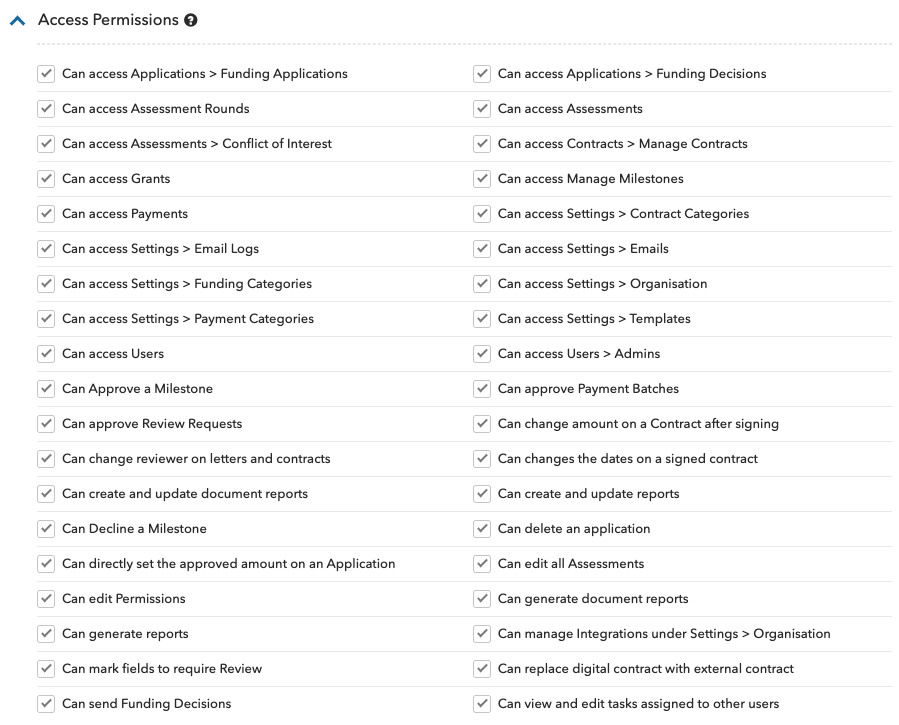
The original Administrator (who invites you into the system) will be able to set what permissions you have, and what you have access to. If you need to amend any of these permissions, touch base with your original Administrator to discuss.
Access is controlled in two places, and most questions involve both:
* [**Administrator Permissions**](/knowledge-base/administrator-help-guides/administrator-permissions-and-user-management/administrator-permissions.md) — what an admin can **do**, such as approving a payment batch or sending a funding decision
* [**Admin Groups & Data Access Rules**](/knowledge-base/administrator-help-guides/administrator-permissions-and-user-management/admin-groups-and-data-access-rules.md) — which **records** an admin can see, and whether they can edit them
\