> For the complete documentation index, see [llms.txt](https://help.tahua.io/llms.txt). Markdown versions of documentation pages are available by appending `.md` to page URLs; this page is available as [Markdown](https://help.tahua.io/knowledge-base/integrations-help-guides/xero/payment-integrations/credit-notes-with-a-xero-integration.md).
# Credit Notes with a Xero Integration
How credit notes raised in Xero flow back into Tahua as Milestone Credits, reducing the outstanding amount on a milestone.
Sometimes funding needs to be credited back rather than paid out, for example when a grantee returns unspent funds, a project is cancelled after a Bill has been raised, or an over-payment needs to be corrected. With the Xero integration connected, credit notes you raise in Xero are automatically reflected against the matching milestone in Tahua, so both systems stay in agreement without any manual updates.
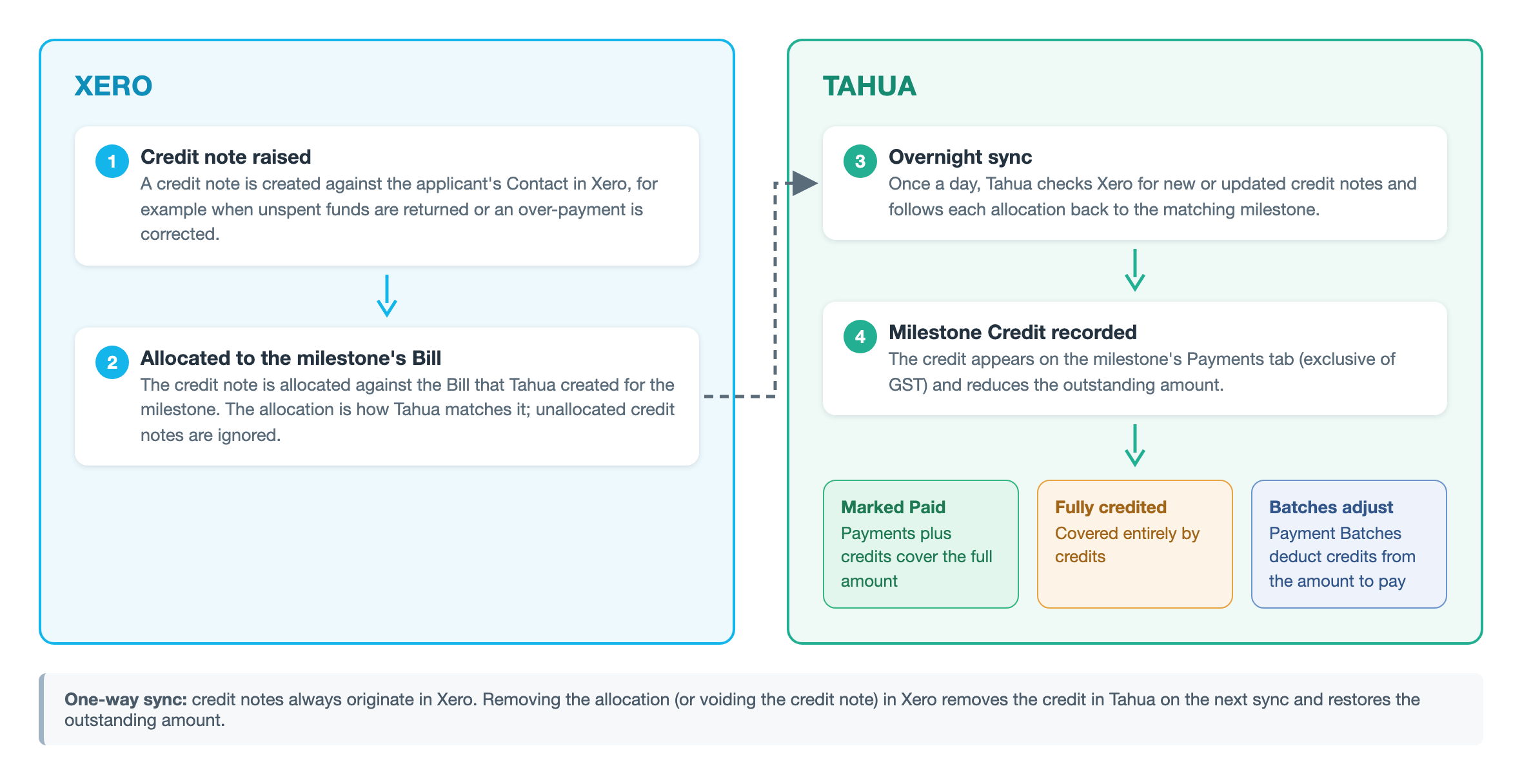
How a credit note travels from Xero into Tahua
## How it works
**Step 1 — Raise a credit note in Xero**\
In Xero, create a credit note against the Contact as you normally would.
**Step 2 — Allocate the credit note to the Bill**\
Allocate the credit note to the Bill that Tahua created for the milestone. This allocation is how Tahua knows which milestone the credit belongs to. An unallocated credit note will not appear in Tahua.
**Step 3 — Tahua syncs the credit note**\
Tahua checks Xero for new or updated credit notes once a day (overnight). When it finds a credit note allocated against a milestone's Bill, it records a **Milestone Credit** in Tahua with the credit note's description, date, and the allocated amount (recorded exclusive of GST).
**Step 4 — The milestone updates automatically**\
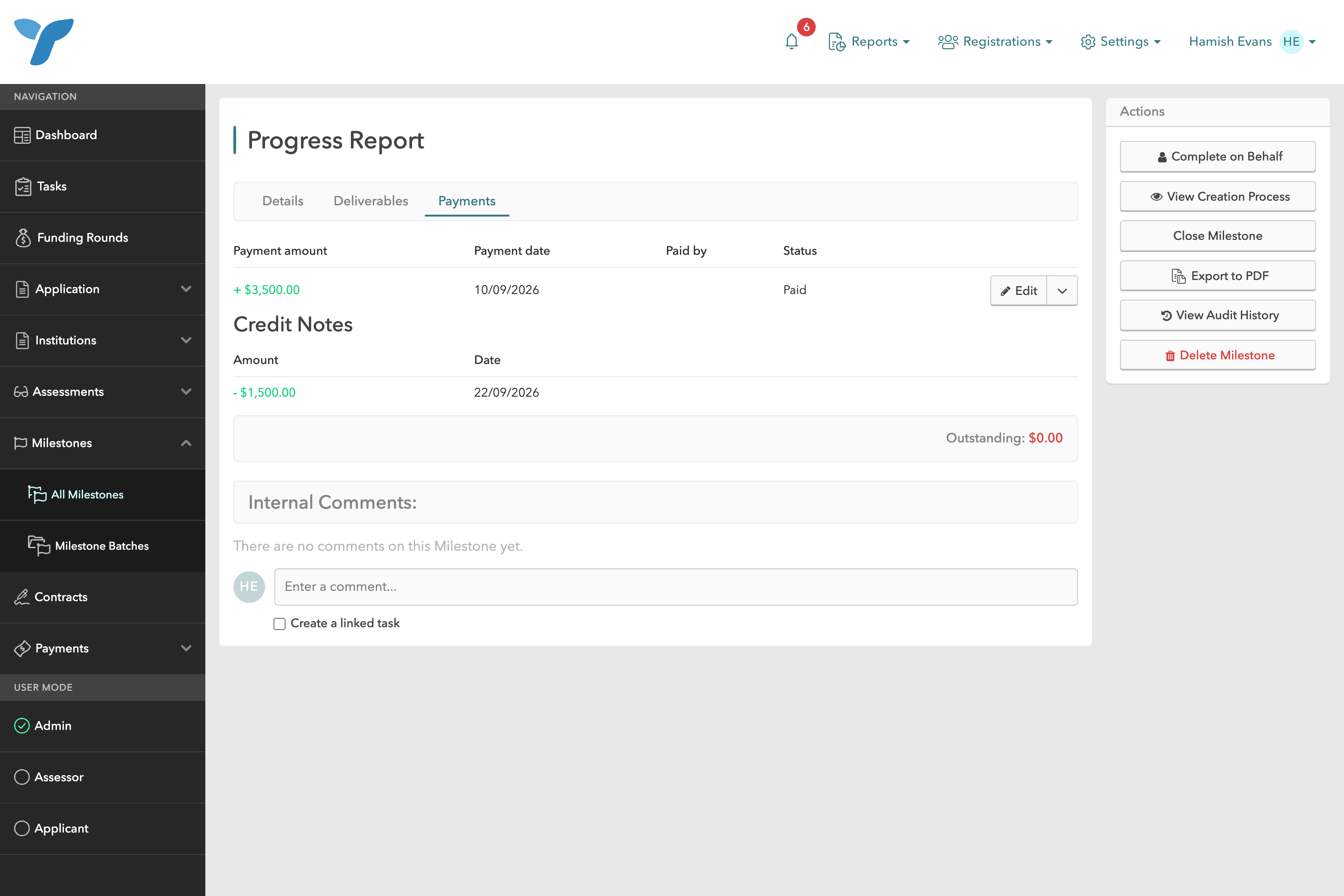
The credit appears on the milestone's **Payments** tab under a **Credit Notes** heading, shown as a deduction alongside any payments. The milestone's outstanding amount is reduced accordingly, and:
* If payments plus credits cover the full milestone amount, the milestone is automatically marked as **Paid**.
* If the milestone amount is covered entirely by credits, it is flagged as **Fully credited**.
In the example below, a $5,000 milestone had $3,500 paid out and the remaining $1,500 credited back via a Xero credit note, leaving nothing outstanding:
A milestone with a $3,500 payment and a $1,500 credit note, fully reconciled
A milestone can also be covered entirely by a credit note, with no payment made at all:
A milestone fully credited by a Xero credit note, with no payments made
## Credit notes and Payment Batches
Milestone Credits are also taken into account when building Payment Batches. The milestone selection screen shows a **Credits** column, and the amount to pay for each milestone is calculated as the milestone amount less any payments already made and any credits. A partially credited milestone will only be paid out for the remaining balance.
## Removing or changing a credit note
Credit note allocations are re-checked on every sync. If you remove the allocation (or void the credit note) in Xero, the corresponding Milestone Credit is removed in Tahua on the next sync, the outstanding amount is restored, and any **Fully credited** flag is cleared.
{% hint style="info" %}
Credit notes sync from Xero to Tahua only. You cannot create a credit note from within Tahua, so always raise and allocate credit notes in Xero.
{% endhint %}