> For the complete documentation index, see [llms.txt](https://help.tahua.io/llms.txt). Markdown versions of documentation pages are available by appending `.md` to page URLs; this page is available as [Markdown](https://help.tahua.io/knowledge-base/integrations-help-guides/xero/xero-faqs.md).
# Xero FAQs
Answers to common questions when integrating with Xero.
How do I connect to Xero?
Refer to our getting started guide - How do I disconnect from Xero?
Refer to our getting started guide - How do I map an Tahua Applicant to an existing Xero Contact?
1. Map an Applicant to a Xero Contact.
2. Navigate to the Applicant page in Tahua.
3. Locate the Xero Contact field.
4. Find the Xero Contact field on the Applicant page.
5. Edit the Xero Contact value.
6. Hover over the Xero Contact value and click it to edit.
7. Select and save the Xero Contact.
8. Locate the Xero Contact from the list and click the Tick icon to save the value.
When does a Milestone get synced to Xero as a Bill?
Milestones can be synced to Xero at different points in the Milestone lifecycle, depending on your Organisation's needs.
You can choose which points you want to sync at from the Xero settings under your Organisation settings by going to your Settings > Organisation menu and clicking on "Edit Details".
The following sync points are available for you to choose from; you can select multiple if you wish.

If you are not using Contracts within Tahua then the only option that is applicable is "When the Milestone is approved".
You can read more about Milestone payments [here](/knowledge-base/integrations-help-guides/xero/payment-integrations/milestone-payments-using-a-xero-integration.md).
Why hasn't a Milestone or Payment synced to Xero?
If the Milestone shows a **Supplied by us** label, or its Payment shows an **Incoming** label, this is expected. These are [Organisation-supplied Milestones](/knowledge-base/administrator-help-guides/milestones/organisation-supplied-milestones.md): obligations your organisation owes the Counterparty, where any Payment is money owed **to** your organisation rather than a Bill you pay.
Tahua never syncs them to Xero, at any sync point. That means:
* no Bill or Xero Contact is created for them
* the **Retry sync to Xero** and **Force payment sync** buttons don't appear on them
* payment status isn't pulled back from Xero, so record the Payment in Tahua yourself once the money arrives
* their Payments are left out of the bank payment file when you export a Payment Batch
What account code are bills coded to in Xero?
You are able to choose which account code your bills are coded to within your Tahua organisation settings.
Navigate to Settings > Organisation and click on "Edit details", locate the Xero Account Code field below:

N.B. You can override this code and apply unique Xero codes for individual funding rounds in the [Grant Round](/knowledge-base/administrator-help-guides/funding-rounds-and-grant-management/create-a-grant-round.md) setup process.
\

Why are my bills coming through to Xero with No GST?
Almost always because no **GST Field** has been mapped against the Applicant type.
Tahua does not hold a "GST registered" flag of its own. It reads the answer the Applicant gave to a Yes/No question on their registration form, and you tell Tahua which question that is under **Settings > Organisation > Registration Types**, on each Applicant type. If nothing is mapped there, every bill syncs as No GST no matter who the Applicant is.
GST is applied only when the saved answer is exactly **Yes** — so a Radio Button field with options worded any other way ("Yes – GST registered", "Registered") will also produce No GST, silently.
See [Registration Type Settings](/knowledge-base/administrator-help-guides/registration-management/registration-type-settings.md) for how to set the question up and map it.
Mapping the field affects future syncs only. Bills already in Xero need correcting there.
How often is payment information synced back to Tahua?
Payment information is pulled from Xero every 24 hours around midnight NZT.
How are Funding Categories tracked in Xero?
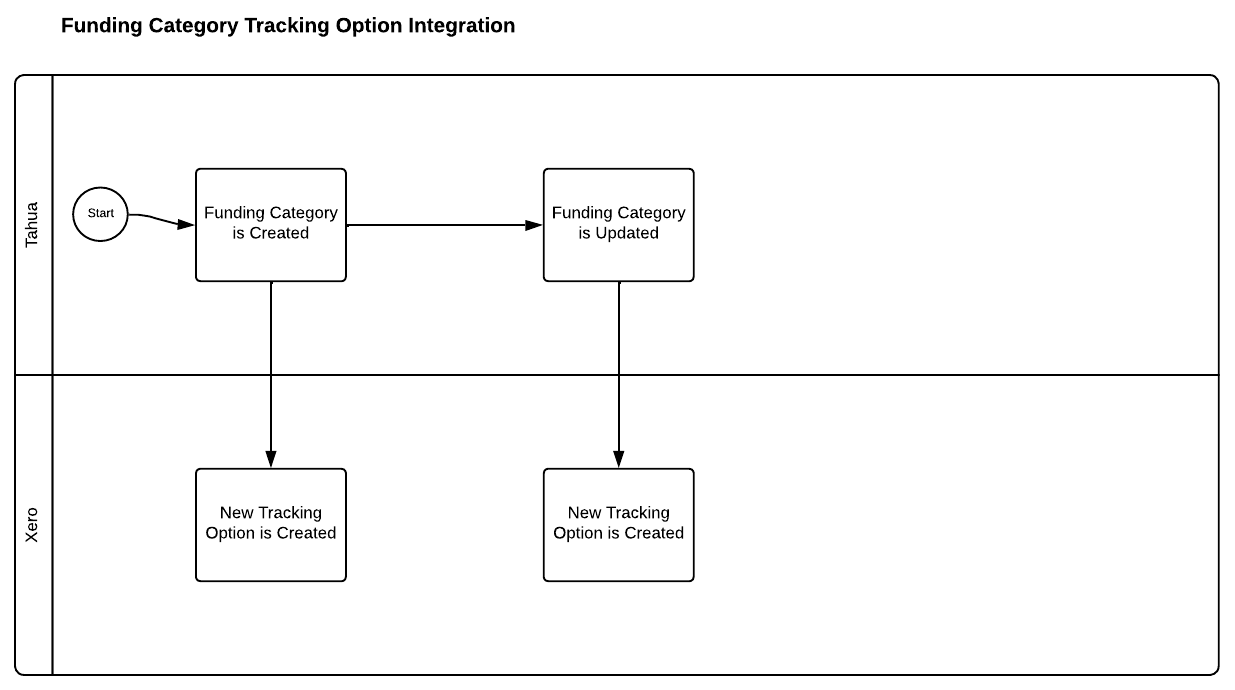
If you use Funding Categories, Tahua can track Milestone bills against them in Xero using Tracking Options under the Xero Tracking Category you select during setup (see [Getting Started with Xero](/knowledge-base/integrations-help-guides/xero/getting-started-with-xero.md)) — "We will create an option for each funding category under this tracking category."
Tracking Options aren't created up front. Instead, the first time a Milestone bill for a given Funding Category is synced to Xero, Tahua checks whether a matching Tracking Option already exists and creates one if it doesn't.
A couple of things to keep in mind:
* If you rename a Funding Category in Tahua, a **new** Tracking Option is created in Xero to match the new name next time a bill syncs — the old option isn't renamed or removed automatically, so you may end up with an unused option left behind in Xero that's worth tidying up.
* Organisations using Contracts can instead have bills tracked against the **Contract Category** rather than the Funding Category. This isn't a self-service setting — reach out to if you'd like this enabled. See [Contract Execution & Milestone Payments](/knowledge-base/administrator-help-guides/contracts/contract-execution-and-milestone-payments.md) for how Tracking Options fit into that flow.